Recent Games
Tampilkan postingan dengan label optimization. Tampilkan semua postingan

Review: Andy's Trains for iPad

Train shunting is a classic puzzle genre, but for some reason the App Store seems to be lacking that kind of games. The recently released Andy's Trains attempts to fill that void.

The game's title screen surprises, showing an animated railway full of switches, semaphores, and tunnels, where several trains are presumably on their way to solve some complicated puzzle.
Developed by the German Andreas Guenther, this is clearly a work of passion, and even if it looks a bit amateurish in places, or perhaps precisely because of that, it stood out amonge the weekly deluge of new puzzle games.

The objective is a standard one for shunting puzzles: you need to operate a switching engine to move rolling stock around the tracks, bringing them to a given destination, in the required order.
It goes without saying that you can operate the switches; the blue outlines indicate the area that must not be occupied by a wagon in order to let the switch toggle.

The care that has been put in the movement of the wagons is apparent. They closely follow the tracks and move very smoothly. Perhaps even too smoothly, as there is a certain amount of inertia that can make it difficult to move precisely.

An interesting twist is that there can be more than one train to put together. Here you have a green and a red wagon, but you must form a train with green and blue wagons.
What will happen is that after you take those two wagons away from the top section of track, another train will arrive bringing two more wagons.

Your solutions are measured by the total distance travelled by the engine, and you are challenged to take that below a given value. This is a deeper challenge than it might seem at first sight. The following puzzle, for example, had me stumped for a while.
Solving it was a piece of cake, but my first attempt was well over 1km, with the target being only 550m. After many attempts, I was convinced that I had optimized my solution as much as possible, but I was still over the target by a few meters. It just seemed impossible.

Eventually, I had an a-ha! moment and figured it out.
I'm not an expert of shunting puzzles, so I had to invent my strategies, and solving this puzzle made me feel smart. That's what I'm looking for in puzzle games: apparently simple challenges, that however require a significant, conscious effort to be mastered.

The game contains 36 puzzles, which must be played strictly in order. Currently I've done a bit less than half of them, and finding a non-optimal solution was reasonably simple even for an uninitiated like myself. Judging from the screenshots on the App Store, however, difficulty will significantly ramp up as the game progresses.

Apart from bridges and tunnels, which should just be cosmetical, I'm curious about the
humps that the App Store description talks about. It looks like those will allow the wagons to be moved by gravity while the engine is somewhere else. Should be fun.

The one thing I don't like about this game is that to get the shortest distance you need not only to find an optimal sequence of moves, but also to implement it with pixel perfect accuracy, fighting with the inertia of the simulation. This can be repetitive and frustrating. However, that's a fair choice, and fits well with the realistic simulation feel of the game.

What definitely should be added, however, is Game Center support! I'd like to compare my scores with the ones of other players.


Summary

Nontrivialness★★★★☆
Logical Reasoning★★★★★
User Interface★★★☆☆
Presentation★★★☆☆
Loading Time★★★☆☆
Saves Partial Progress✘
Status Bar✘

©2014 Nicola Salmoria. Unauthorized use and/or duplication without express and written permission is strictly prohibited. Excerpts and links may be used, provided that full and clear credit is given to Nicola Salmoria and nontrivialgames.blogspot.com with appropriate and specific direction to the original content.

Review: Euclidea for iPad

To put it briefly, Euclidea is a game that every math student should have and, in an ideal world, every adult should like.
The game was developed by the Russian Horis International Limited, which seems to be specialising in apps with a strong maths background. Some time ago they also released Quick Route, a nice puzzle based on the Travelling Salesman Problem.

The concept isn't new; we have seen it for example in the browser game Euclid: The Game. However, the implementation in Euclidea is perfectly done, making it an absolute joy to play.

The idea of the game is to solve geometric problems by using compass and straightedge constructions. For example here you are asked to construct the perpendicular bisector to a segment.
Most of these constructions are things that all of us should have done in school; however, at least in my case, they were thought more to learn how to follow instructions and use the drawing tools precisely, than to understand why the constructions worked.

In Euclidea, you are on your own, and have to figure out what to draw to reach the requested goal. The user interface works beautifully, and as you draw your circles and segments they precisely snap to the reference points nearby.

A brilliant feature, not found in other similar games, is that you can freely move all the arbitrary points in your constructions, to verify that they work in general. For example, here I constructed the bisector of an angle.
The game has already highlighted it in yellow, to indicate that my solution is correct. But I can make angle smaller...
... or larger, and see how the circles I constructed change accordingly.
Some of the constructions you have to make are particularly significant, and after you do them they are added as shortcuts to the toolbox. For example you'll learn to draw a circle of given radius. This is equivalent to fixing the opening of the compass, something not directly allowed in pure compass and straightedge constructions.
The additional tools are just shortcuts that allow you to make common operations without explicitly doing all the steps, but their cost is still computed considering all the fundamental steps (in the case above, 5 moves). This is important because the funniest part of the game is not just to solve the problems, but to do it in the optimal number of moves.

For example, one of the problems is to translate a segment. Using the parallel line tool, this is trivial to do:
But with the parallel line costing 4 moves, this took us 9 moves. To do it in 6 moves as requested, we'll have to be more creative.

Some of the problems are even move restrictive, requiring to make constructions that use only the straightedge and not the compass, or the other way around. Those can be challenging. Find the instersection of a circle and a segment without drawing the segment? I haven't solved that one yet.
The game has been updated several times since the initial release and currently contains 36 challenges, plus some tutorials. Initially the levels must be solved in order, but after some point (I think after unlocking all the additional tools) everything is unlocked. The last few problems are not easy.

My main gripe is that the game doesn't store your constructions, so if you go back to a puzzle you played previously you have to start from scratch. I would have liked to be able to see my best effort, instead of having to reconstruct my steps every time.
I also don't like the horizontally scrolling list of puzzles, which is cumbersome to navigate and wastes a lot of space. A grid might have worked better.

But those are really minor things! The best part of all this is that the game is totally free, with an optional in-app purchase to turn off banner ads. It is so rare to see a game like this so well done, that I gladly made that purchase, hoping that the developers will continue to improve this gem.


Summary

Nontrivialness★★★★☆
Logical Reasoning★★★★★
User Interface★★★★☆
Presentation★★★★☆
Loading Time★★★★★
Saves Partial Progress✘
Status Bar✔

©2014 Nicola Salmoria. Unauthorized use and/or duplication without express and written permission is strictly prohibited. Excerpts and links may be used, provided that full and clear credit is given to Nicola Salmoria and nontrivialgames.blogspot.com with appropriate and specific direction to the original content.

Review: The Weaver for iPhone and iPad

The other day I noticed the polished icon of The Weaver among the new releases, and I was thrilled to see that it was developed by the Portuguese Pyrosphere.
Pyrosphere might not be as well known as other big names in the industry, but I think it is one of the best developers of puzzle games in the world. I've reviewed other great games by them in the past: Lazors, Chess Light, and Bloom Box.

I wasn't disappointed; The Weaver is excellent, and I couldn't stop playing until I had almost finished it.

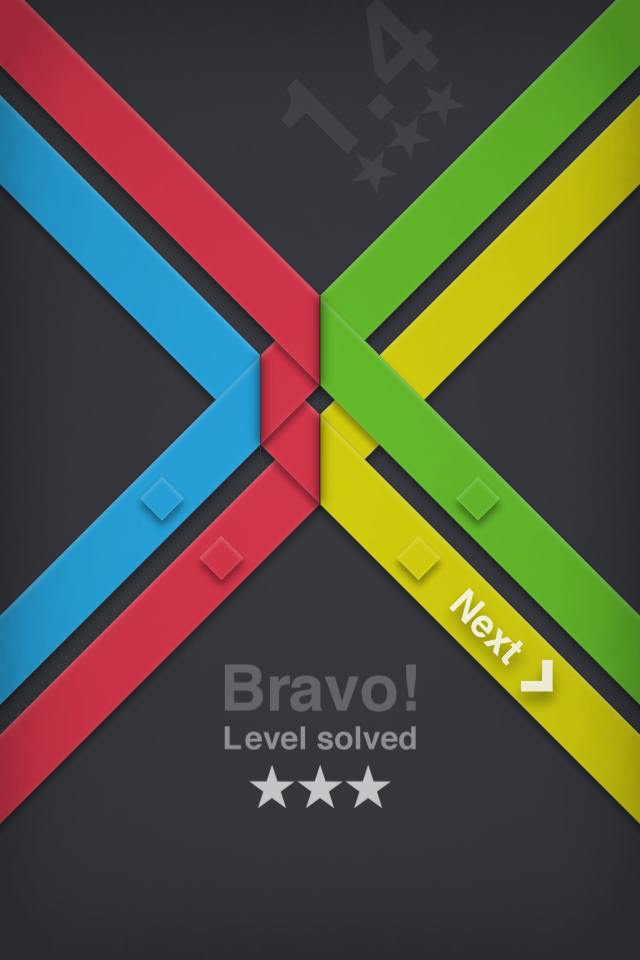
There is a remarkable number of ribbon-weaving puzzle games: clearly it has something that appeals to our playful side. I reviewed TAPES just last week, but the obvious precursor of this game is Strata  In my review, I criticized Strata because it was possible to solve all its puzzles using a mechanical procedure. I'm glad to say that while The Weaver looks remarkably similar at first glance, it doesn't have a similar weakness.

The play area consists of a few colored ribbons entering from above. Their paths are blocked by colored squares; your objective is to route the ribbons in such a way that each ribbon exits the screen passing over a square of the same color.
One move consists of tapping one of the intersections. That folds the two ribbons passing there, making them go in the opposite direction. For example here my first move is on the blue and green ribbons, which produces this result:
The blue ribbon was able to exit the screen because it's now passing over a blue square.

Note that the fold only happens along a vertical line: this means that the ribbons always enter from the top, change direction a number of times, and exit from the bottom. You cannot send a ribbon back to the top. This fact can be used for many logic deductions.
For example in the position above if I let the green ribbon go over the red one, there's no way to make it climb back to the green exit. Therefore, I must put a fold on the red/green intersection, like this:
And with a final move, the puzzle is solved.
In this case the solution was unique, but in general the puzzles can be solved in multiple ways. The number of stars you get depends on how many folds you did. Note that you can do as many moves as you want while solving the puzzle; the only thing that matters is how many folds are left at the end.

I haven't verified this, but knowing the quality of Pyrosphere's puzzles I'm pretty sure that every puzzle has only one 3-star solution.

As you progress through the game, there are no additional mechanics: the only things that change are the sizes of the puzzles (which aren't necessarily square), and the number of colors shown on each exit. Interestingly, having more options on each exit actually makes the puzzles harder, not easier, because it adds uncertainty, and the optimal solution is only one.
But there are logic deductions that can be applied to this additional uncertainty, too. For example in the above puzzle there is only one purple ribbon, which must exit from the bottom left. All the other purple exits are just decoys that can be ignored.

Things get more and more complicated and in the later puzzles it becomes difficult to solve the puzzles solely through logic; like in Lazors, you have to also rely on intuition and experimentation.

Often times, you can reach a suboptimal solution rather quickly but then have to spend a lot more time improving it if you want to get three stars.
One thing to note is that, unlike in other games, in this one the ribbon metaphor wouldn't be really needed. Instead of ribbons, you could have had light beams and vertical mirrors: the effect on the puzzle mechanics would have been identical.

However, it wouldn't have been nearly as fun: the use of ribbons is a major element in the appeal of this game. The way how the animate as you make your moves is relaxing and almost hypnotic. I think this game is a perfect application of a game design principle well explained by Ted Brown in an article I read some time ago:
Give [your players] a clear goal, give them a simple way to achieve that goal, give them fantastic feedback, and stop there. It might be enough.
I'd also like to mention that while I've been growing used to recent games running poorly on my old 4th Gen iPod Touch, this one runs beautifully. So don't waste any more time and go download this little treasure.


Summary

Nontrivialness★★★★☆
Logical Reasoning★★★★☆
User Interface★★★★☆
Presentation★★★★★
Loading Time★★★★★
Saves Partial Progress✘
Status Bar✘

©2014 Nicola Salmoria. Unauthorized use and/or duplication without express and written permission is strictly prohibited. Excerpts and links may be used, provided that full and clear credit is given to Nicola Salmoria and nontrivialgames.blogspot.com with appropriate and specific direction to the original content.

Review: Perfect Paths for iPhone and iPad

Hyperbolic Magnetism, in the person of Jan Split Ilavsky, surely knows how to make puzzle games that stand out from the crowd. Perfect Paths is his best so far.
Perfect Paths is based on the previous Trappped, an iPad-only game which I think was let down by the layout of the user interface. While they share the basic mechanics, everything else has been improved so much that it can be considered a wholly new game.

Since the launch of Threes, I've seen more and more developers make animated gifs to showcase their game, which is great because it makes it so much easier to explain what the game is about. So here is Perfect Paths in all its glory:
If you feel a bit overwhelmed, that's fine: the mechanics are complex. The game does a good job of introducing the concepts one at a time, so let's start from the beginning.

Your goal is to bring the blocks over the circles of the same color. To do that, you use arrows. You draw the whole path in advance, then when you are satisfied tap the play button. The blocks then start dancing an elaborate dance, underlined by very appropriate sound effects and elegant animations. It's fun to watch just for that, even if your plan fails, as will happen most of the time.
The immediate comparison that springs to mind is the classic Trainyard. That is, however, a very different game; in many ways, easier and more intuitive. The key concept of Trainyard is the railroad switches which toggle every time a train passes through them. Once you understand how those work, you can do pretty much anything, and solving the puzzles is mostly a matter of adjusting the initial position of the switches.

Parfect Paths, however, has nothing like that. Once you set an arrow, every block that passes through that cell will go in the same direction; you can't make one block turn left and the next one turn right. The only slight exception to this is crossroads, shown as diamonds on the board.
When a block passes through a crossroad, it just goes straight through it. This allows the paths to intersect, but there's not much else you can do without the other mechanics.

One important limitation is that you cannot put arrows on the goal squares (which makes sense because otherwise after reaching the goal the block would be sent away!) nor on the dashed squares. This creates configurations like the following one where some goals are apparently unreachable.
The solution to this is to use one block to push another. If you line up the blocks vertically so that the yellow one is on top and the red one is below it, when the red block moves up it will push the yellow one, and they can both reach their goals at the same time.

The extension of pushing is the other weapon you have at your disposal: by placing on the board the chain symbols that you can see at the bottom left of the screen, you can join blocks, so that when one of them moves the other will move together with it. Using this possibility can also be a requirement of the puzzles, like in this one, where the white lines between some of the goals indicate that the blocks over those cells must be joined (and note that like with arrows, you can't simply put a chain command over a goal cell).
The other two icons you can see at the bottom are the inverse command: they let you separate blocks which had previously been joined.

If you have been following carefully, you might have wondered about a possible loophole in the rules: what should happen if two blocks are joined and they are on two arrows with conflicting directions, e.g. one up and one down? Which direction should they go?

The answer lies in the most subtle element of the game: the phase timeline. The arrows are not all active at the same time: instead, one direction is processed at a time. After you tap the play button, you can see the phase timeline scroll at the bottom of the screen, showing the order of things: first UP, then DOWN, then RIGHT, then LEFT.
When the blocks start pushing and linking, the phase order becomes very important to make things work as you want, and can lead to unexpected results.

As you can see, the game's rules are surprisingly deep, and despite all the efforts that have been made to give it a gentle learning curve, the mechanics can take a while to get used to, especially if you have played Trainyard. You need a completely different mindset to solve these puzzles; the lack of control over the arrows can be extremely frustrating until something finally "clicks" in your head. I have to say that I was stuck on the Alpha Pegasus level for a long time before getting it. (Hint: remember what you did in the Cassiopeia levels).

I liked the premises and the style of one of the Jan's previous games, Escapology (developed with Vladimir Hrincar), though I marked it down in my review for having many puzzles but of erratic quality. It has to be said, however, that since then I haven't found any better game with similar mechanics.

Perfect Paths, if anything, has the opposite problem, being a bit light on content. I was lucky enough to play a beta version of the game, and I've already solved all the puzzles. However, the pack selection screen shows a couple of important things.
The first one is the promise of new puzzles to be released every week. This will be done using app updates, so if the author can keep his promise, this will be an absolutely great and novel way to keep players engaged over time without flooding them with annoying push notifications. While a few games have provided content updates from time to time, I think this would be the first time it would be done so frequently.

The second important thing on that screen is how prominently the Game Center leaderboards are displayed. They are right there on the same screen as the puzzles, instead of being tucked away inside the standard Game Center pages. This is useful because the solutions to the puzzles are totally open to your creativity, and the game doesn't provide any reference to judge how good they are, so comparing with other players is the only way to put them in context.

It is a testament to the quality of the game that despite having solved all the puzzles, I keep coming back to it attempting to further improve my score. The name Perfect Paths is very fitting, because for a programmer's mind like mine, just finding a solution isn't enough: you want it to be the best one possible, and compete on the leaderboards to prove it. Which isn't that easy if one of your friends is Federico Prat Villar.

The user interface works fine, though I found the erase button to work a bit counterintuitively and require too many taps to correct your path. Also, since most of the playing time is spent looking for optimisations, I wish the puzzle list showed thumbnails (to find quickly the puzzle you think you can improve) and there was a quick way to move to the prev/next puzzle instead of going through the puzzle list every time.I also wish that the back button had a bit larger hit area because it's difficult to tap it when the iPad is inside a case covering part of the bezel.

If you want to try and improve your leaderboard standings, let me spend a few words on how the scoring works. There are only two things that affect the score: the number of arrows you use, and how many steps it takes for the solution to run. In both cases, the less, the better.

Optimizing the first parameter is obvious: just try to use as less arrows as possible. A nice thing is that after being introduced to the advanced mechanics later in the game, you can go back to the first few levels, which you solved naively, and try to improve them using the new elements at your disposal. So do use those combinators in Andromeda!

Optimizing the solution run time is subtler. Clearly, a shorter path should be quicker. However, because of the phase timeline, blocks are slow to travel in a straight direction: 4 phases (up, down, right, left) need to pass between one move and the next. So for example if you need to move 2 cells up and 2 cells right, doing UP, UP, RIGHT, RIGHT isn't the fastest option: it needs 1+4+2+4=11 steps.  If you do UP, RIGHT, UP, RIGHT instead, you need only 1+2+2+2=7 steps.

It's important to note that you get a lot of points for just solving the puzzles, while what you get for optimizing them is peanuts in comparison. When you look at the leaderboards, a difference of just one point means a lot more than it seems.

Without a doubt this is one of the best puzzle games of the year, and it promises to only get better over time, so stop wasting time and go buy it. And beat my score if you can :-)

Summary

Nontrivialness★★★★★
Logical Reasoning★★★★★
User Interface★★★☆☆
Presentation★★★★☆
Loading Time★★★★★
Saves Partial Progress✔
Status Bar✘

©2014 Nicola Salmoria. Unauthorized use and/or duplication without express and written permission is strictly prohibited. Excerpts and links may be used, provided that full and clear credit is given to Nicola Salmoria and nontrivialgames.blogspot.com with appropriate and specific direction to the original content.
 
Support : Creating Website | Johny Template | Mas Template
Copyright © 2013. IOS Puzzle Games Review - All Rights Reserved
Template Created by Creating Website Published by Mas Template
Proudly powered by Blogger